
Fix Forticlient VPN Download Stuck Or Not Working At All


 4 min. read
  Published on
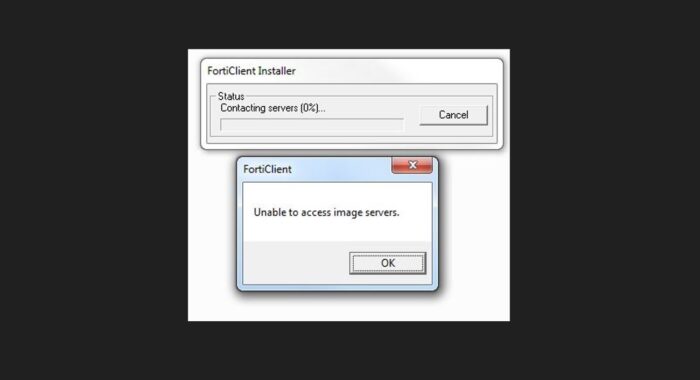
Most FortiClient download issues come down to three things: unstable web installers, old file conflicts, or missing Windows components. You do not need to be an IT expert to fix this. Follow these steps to get the software on your machine and running.
Table of contents
Troubleshooting FortiClient Download and Setup Issues
1. Use the Offline Installer Instead
The standard download link on the Fortinet website is usually a “web installer.” This small file tries to download the rest of the program while it installs. If your internet flickers even for a second, the whole process dies. The best fix is to grab the full package beforehand.

Access content across the globe at the highest speed rate.
70% of our readers choose Private Internet Access
70% of our readers choose ExpressVPN

Browse the web from multiple devices with industry-standard security protocols.

Faster dedicated servers for specific actions (currently at summer discounts)
- Stop the current attempt: Cancel any stuck downloads or frozen installation windows.
- Find the full package: Look for a source that provides the FortiClient VPN offline installer. This file is larger but contains everything you need inside it.
- Disconnect and Install: Once you have the offline file, you can even disconnect from the internet to ensure no network interruptions interfere with the setup wizard.
2. Remove Corrupt Registry Files and Leftovers
If you had FortiClient on your computer before, or if a previous installation failed, “ghost” files are likely blocking the new download. You need to wipe the slate clean.
- Uninstall via Settings: Go to Settings > Apps > Installed Apps and uninstall any version of FortiClient listed there.
- Clear Temporary Files: Press
Windows Key + R, type%temp%, and delete the contents of that folder. - Restart: This is non-negotiable. Restarting releases locked files so the new installer can write to the disk.
3. Update Visual C++ and Windows Components
FortiClient is picky. It relies on specific Microsoft tools to run. If your computer is missing these tools, the download might finish, but the app will refuse to open or install.
- Check Windows Updates: Go to Settings and ensure there are no pending system updates.
- Install C++ Redistributables: Search for “Microsoft Visual C++ Redistributable” on the official Microsoft site.
- Download and Run: Install both the x86 and x64 versions to ensure full compatibility, then try the FortiClient installer again.
4. Fix Network Handshake Errors
Sometimes the software installs, but you cannot download the configuration or connect to the gateway. This often looks like a download failure because the progress bar stalls at 10% or 40%. This is usually a firewall issue preventing the specific VPN handshake.
- Disable Third-Party Antivirus: Temporarily turn off software like McAfee or Norton, as they often block the installation of network drivers.
- Check for IP Errors: If you are getting specific error messages about the gateway being unreachable, you are likely facing an IP connection error in FortiGate.
- Allow Through Firewall: Go to Windows Defender Firewall and ensure the FortiClient installer is on the “Allowed Apps” list.
5. Consider a VPN That Requires Less Configuration
Fortinet is built for complex corporate environments. If you look at the Fortinet market share statistics, you will see they are a giant in enterprise security. Their software is designed for IT teams to manage, not for ease of use.
If you are tired of debugging driver conflicts and just want a VPN that works the moment you click “Download,” you should consider buying ExpressVPN.
- Instant Setup: There are no offline installers or C++ libraries to hunt down. You download it, install it, and it works.
- Better for Streaming: Unlike corporate VPNs which throttle speed, ExpressVPN is optimized for fast media consumption.
- Zero Configuration: You do not need to know port numbers or IP gateways.
Switching to a consumer-focused paid VPN like ExpressVPN removes the technical friction. You are paying for the convenience of never having to read a troubleshooting guide like this again.
FAQs
This is typically a server-side issue or a browser block. Try clearing your browser cache or downloading the file using a different browser like Edge or Firefox.
Yes, but you must use the latest version (7.0 or higher). Older versions of the client often fail to install on Windows 11 due to driver signature enforcement updates.
This means the downloaded file is incomplete or corrupted. You need to delete the file, disable your antivirus temporarily, and download the installer again.
No. Installing a VPN requires modifying network drivers, which always requires administrator privileges on Windows and macOS.
Corporate VPNs like FortiClient encrypt traffic heavily for security, not speed. If you need speed for video or personal browsing, a dedicated consumer VPN service is usually much faster.


Read our disclosure page to find out how can you help VPNCentral sustain the editorial team Read more


Improve this guide


User forum
0 messages