
How to Hide Your IP on TikTok (Quick Fix) 🎯


 5 min. read
  Published on
If you want to use TikTok without revealing your real IP address, there are several secure ways to do it.
This guide explains how to hide your IP step by step on Android, iPhone, and desktop, while also showing what to expect, how it affects your TikTok views, and how to stay safe from regional restrictions.
Table of contents
Why Hide Your IP on TikTok?
When you open TikTok, your IP address automatically reveals your approximate location. TikTok uses that data to serve regional content and ads. It can also influence your analytics and audience reach, especially if your content is limited to a certain country.
Besides privacy, many users hide their IP to access TikTok from countries where it’s blocked or to avoid account shadow-bans linked to IP tracking.
If you ever saw messages like “TikTok access denied,” your region or ISP is probably restricting the app. Learn more about that in this TikTok Access Denied guide.
What You Can Use to Hide Your IP
TikTok doesn’t have an in-app option to hide your IP, so you’ll need a network-level solution. The main options are:
- VPN (Virtual Private Network): Encrypts your data and routes it through another country, masking your real IP.
- Proxy: Works on a single app or browser, but offers no encryption.
- Mobile data switch: Changes your IP temporarily, though it’s not reliable.
- TikTok privacy settings: Restrict permissions like location and personalized ads, but don’t mask your IP entirely.
Among these, a VPN is the safest and easiest. You can even use one optimized for your device, such as a TikTok VPN for iOS if you’re on iPhone or iPad.
Step-by-Step: Hide Your IP on TikTok
Use a VPN
Below are the steps you can follow depending on your device.
- Download a trusted VPN app.
Go to the Google Play Store or Apple App Store. Choose a VPN with no-logs policy and fast streaming servers, such as ExpressVPN.
- Connect to a secure server.
Open the VPN, pick a country like the US or UK, and tap Connect. Once active, your real IP becomes hidden. - Clear TikTok cache.
- On Android: Settings → Apps → TikTok → Storage → Clear Cache and Clear Data.
- On iPhone: uninstall and reinstall TikTok.
- Launch TikTok with VPN on.
Open the app, check your “For You” feed, and confirm that content now matches the new region.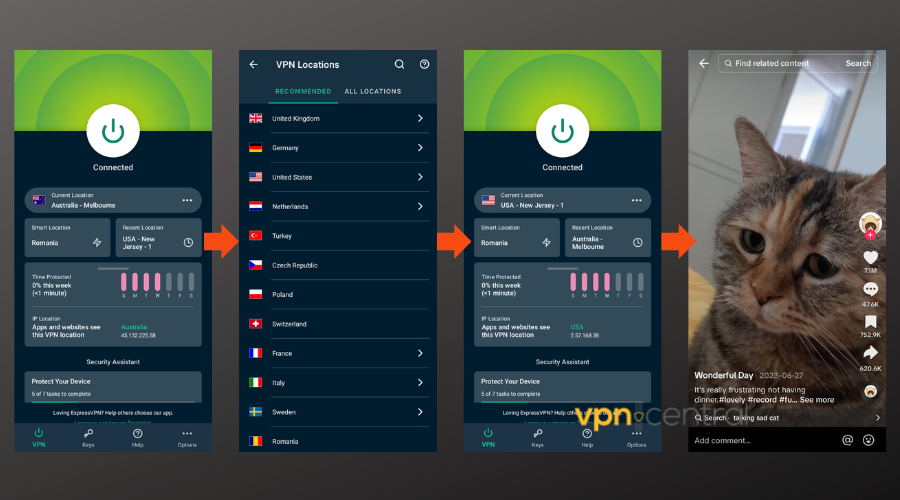
- Block location permissions.
- iOS: Settings → Privacy → Location Services → TikTok → Never.
- Android: Settings → Location → App permissions → TikTok → Deny.
✅ Tip: Keep the VPN connected while you scroll or upload to prevent IP leaks.
Advanced Options for Full Anonymity
- Use a dedicated IP VPN: This gives you a clean, private address not shared with others.
- Combine VPN with a proxy: Ideal for social media management or influencer accounts operating in multiple regions.
- Rotate devices: Using a secondary phone or virtual device helps separate personal data from business profiles.
Tips for Safe IP Hiding
- Avoid free VPNs: They often sell data or leak your IP.
- Check VPN status before launching TikTok.
- Stick to one region: Constant IP changes can confuse TikTok’s algorithm and affect your For You feed visibility.
- Use strong passwords and two-factor authentication.
- Don’t break TikTok’s ToS: Accessing banned content or automating activity could get your account flagged.
Wondering whether using a VPN affects your performance metrics? Check this detailed breakdown on how VPNs affect TikTok views.
IP-Hiding vs. Region-Changing
| Feature | Hide IP Only | Change Region |
|---|---|---|
| Goal | Keep your real address private | View or post from another country |
| Main Tool | VPN or proxy | VPN + device region change |
| Encryption | Yes (VPN) | Yes |
| Affects algorithm | Slightly | Significantly |
| Best for | Privacy | Geo-restricted content |
After You Hide Your IP
Once your VPN or proxy is active:
- Open TikTok and verify the region through local hashtags or trending videos.
- Log in carefully, use only verified VPN IPs to avoid triggering account verification requests.
- If your account focuses on a certain audience, stay consistent with one region’s IP.
- Restart your device if TikTok still loads old region data.
FAQs
Yes, partly. TikTok can use GPS, SIM card, or Wi-Fi data. Disable location services and avoid linking other social apps.
Yes, in most countries. It only becomes a problem if you use it to violate local restrictions or TikTok’s policies.
You can, but free VPNs are slower, less secure, and sometimes leak IPs. Use a reputable paid provider for better stability.
iOS users should use services designed specifically for the platform. Learn which ones work best in this TikTok VPN for iOS guide.
Smart Privacy Practices on TikTok
- Revoke permissions for camera and microphone when not using the app.
- Use a secondary email for TikTok sign-ups.
- Avoid posting identifiable background details in videos.
- Check your active sessions under Settings → Security and login to detect unfamiliar devices.
Keep Control of Your Online Identity
Hiding your IP on TikTok protects your privacy, keeps your activity harder to trace, and lets you view global content safely. Whether you use it for personal browsing or creator marketing, a solid VPN setup and careful privacy habits will help you maintain full control of your data and digital identity.


Read our disclosure page to find out how can you help VPNCentral sustain the editorial team Read more


Improve this guide




User forum
0 messages