
How VPN Works: The Complete Guide


 4 min. read
  Updated on
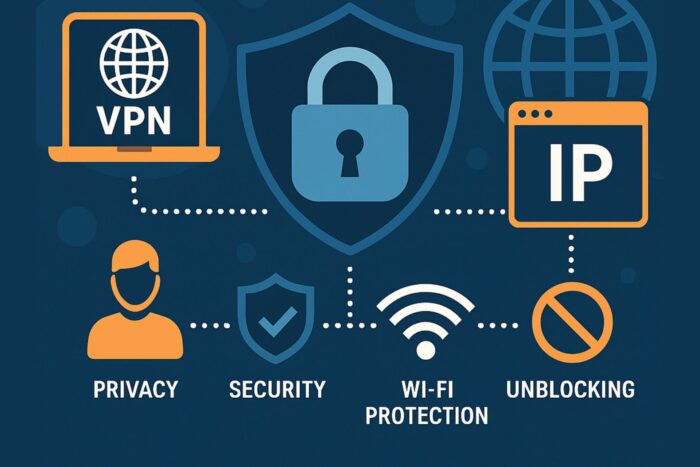
A Virtual Private Network (VPN) has become essential for anyone concerned about online privacy, security, or unrestricted access to the internet.
Understanding how VPN works is the first step to choosing the right service and using it effectively. By encrypting your data and routing it through remote servers, a VPN hides your IP address, protects against eavesdropping, and lets you access blocked content safely.
Table of contents
What Is a VPN and How It Works
A VPN (Virtual Private Network) is a service that creates a secure, encrypted tunnel between your device and the internet. When connected, your online traffic travels through this tunnel to a remote VPN server, which masks your real IP address and protects your data from third parties.
For a visual breakdown of the process, see this How VPN Works Diagram.
Why You Should Use a VPN
- Protect privacy and identity: Stop ISPs, advertisers, or hackers from tracking you.
- Stay secure on public Wi-Fi: Encrypt your traffic on hotel, café, or airport networks.
- Unblock content: Access streaming services and websites restricted by region.
- Enable safe remote work: Connect securely to company resources from anywhere.
Core Technologies That Make VPNs Work
Encryption and Security Keys
A VPN secures data by encrypting it into unreadable code before it leaves your device. Only the VPN server can decrypt it using shared keys. Standards like AES-256 or ChaCha20 make this virtually impossible to crack.
VPN Tunneling Protocols Explained
| Protocol | Benefits | Drawbacks |
|---|---|---|
| OpenVPN | Secure, open-source, flexible | Can be slower due to overhead |
| WireGuard | Fast, modern, lightweight | Newer, fewer long-term audits |
| IPSec / L2TP | Widely supported, strong | Setup complexity, easier to block |
| SSTP | Works over HTTPS, firewall bypass | Mostly Windows-focused |
IP Masking and Routing
- Your device encrypts traffic and sends it to the VPN server.
- The server replaces your real IP address with its own.
- Websites see only the VPN server’s IP, keeping your location hidden.
Step-by-Step: How a VPN Connection Works
- Launch the VPN app and select a server.
- Handshake begins: client and server agree on protocol and encryption.
- Secure tunnel established: all traffic routes through it.
- Data encrypted before leaving your device.
- VPN server forwards requests using its IP.
- Responses return encrypted back through the tunnel.
- Session ends when you disconnect or the tunnel closes.
How VPN Works on Mobile Devices
Mobile users face unique challenges. Phones constantly switch between Wi-Fi and cellular, which can interrupt VPN tunnels. Lightweight protocols like WireGuard help maintain connections and preserve battery life.
For in-depth details, see How VPN Works on Mobile.
How a VPN Protects Your Network
- Encrypted traffic to block snooping on public Wi-Fi
- IP masking to hide location and prevent tracking
- Secure access to private networks for remote work
- Additional compliance and safety for sensitive data
Learn more about these protections in How VPN Helps in Securing Network.
Limitations of VPNs You Should Know
- VPNs can slow down internet speed due to encryption.
- You must trust the VPN provider not to log or sell your data.
- VPNs cannot stop malware infections or phishing attacks.
- Misconfigured setups may lead to DNS or IP leaks.
- Some regions restrict or block VPN usage.
- Free VPNs often sacrifice privacy for ads or tracking.
How to Choose the Right VPN
| Feature | Why It Matters |
|---|---|
| Strong encryption & modern protocols | Ensures maximum privacy and speed |
| Verified no-logs policy | Reduces the risk of data misuse |
| Large server network | More choices for bypassing restrictions |
| Kill switch & leak protection | Prevents data leaks if VPN drops |
| Cross-device compatibility | Works consistently on desktop & mobile |
| Ease of use | Fewer setup errors, better adoption |
For basics, see the detailed guide on What Is VPN.
Frequently Asked Questions
No. It hides your traffic from ISPs and network owners, but websites you log into still see your activity.
Yes. Some overhead is inevitable, but efficient protocols like WireGuard minimize it.
Most countries allow VPNs, but some heavily restrict or ban them. Always check local laws.
They protect your connection, but not your device. Malware and phishing require other tools.
Yes. As long as the VPN uses strong encryption and you’re on HTTPS websites, it adds an extra security layer.
Summary
VPNs work by encrypting data, routing it through secure servers, and hiding your IP address. They protect privacy, secure connections on public Wi-Fi, and unlock global content. Still, they’re not a cure-all—you must choose a reputable provider and understand their limitations.


Read our disclosure page to find out how can you help VPNCentral sustain the editorial team Read more


Improve this guide


User forum
0 messages